SKU: OT760-D37 Numer artykułu: AA115 EAN: 8720589817258

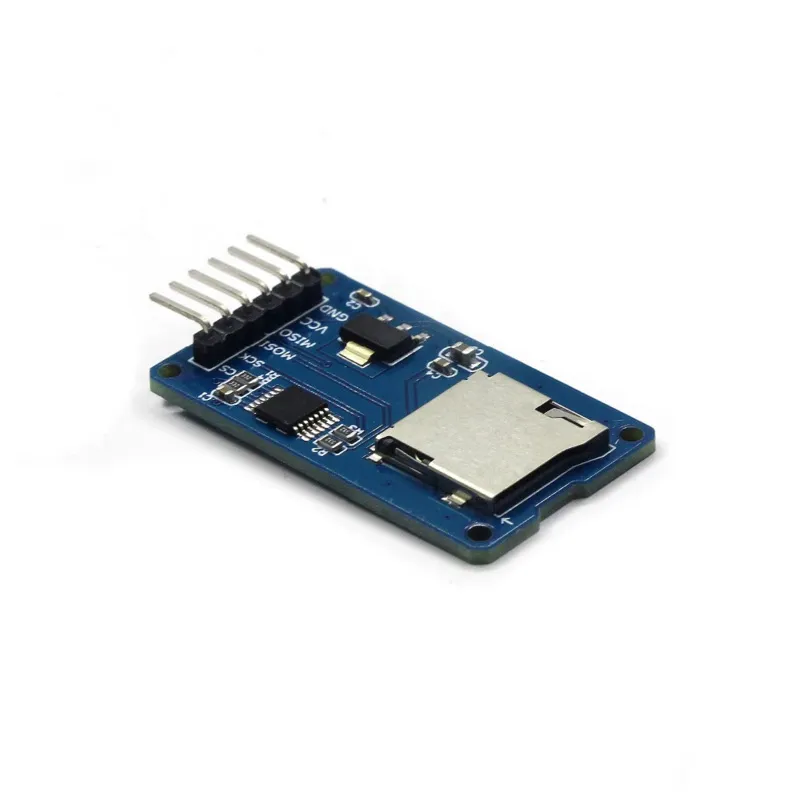
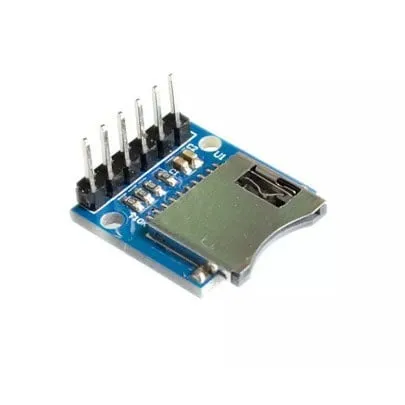
Ten czytnik kart micro SD jest odpowiedni do Arudino, ESP8266, ESP32, Wemos itp. Jest już częścią standardowej biblioteki Arduino.
Idealny do odczytu i zapisu plików. Pojemność pamięci zależy od włożonej karty micro SD.
Typ karty: Micro SD do max. 2GB i Micro SDHC do max 32GB
Prąd obwodu: 3.3V i 5V
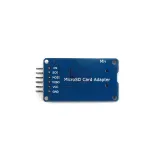
Połączenia: VCC, GND, MISO, MOSI, SCK/SPI i CS
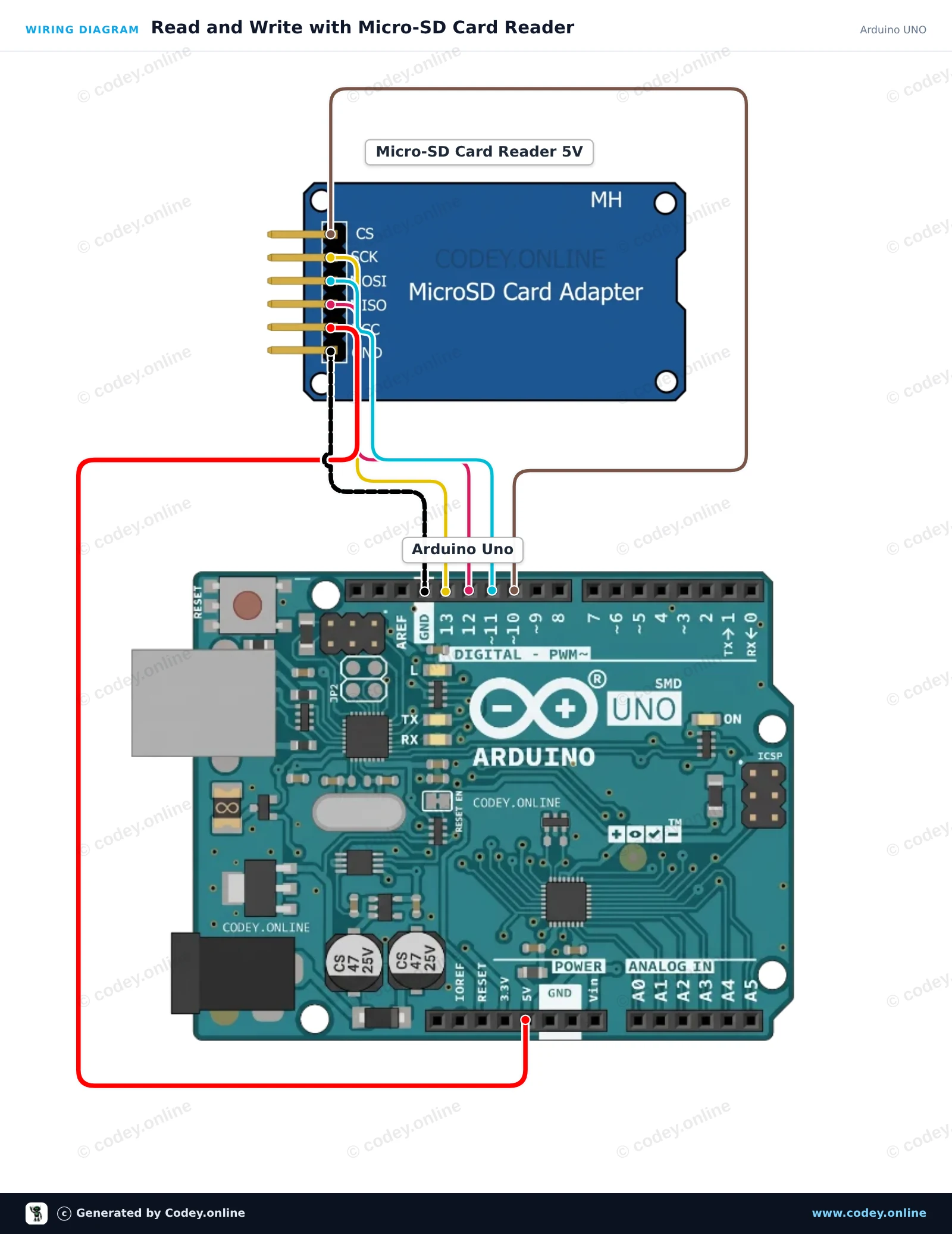
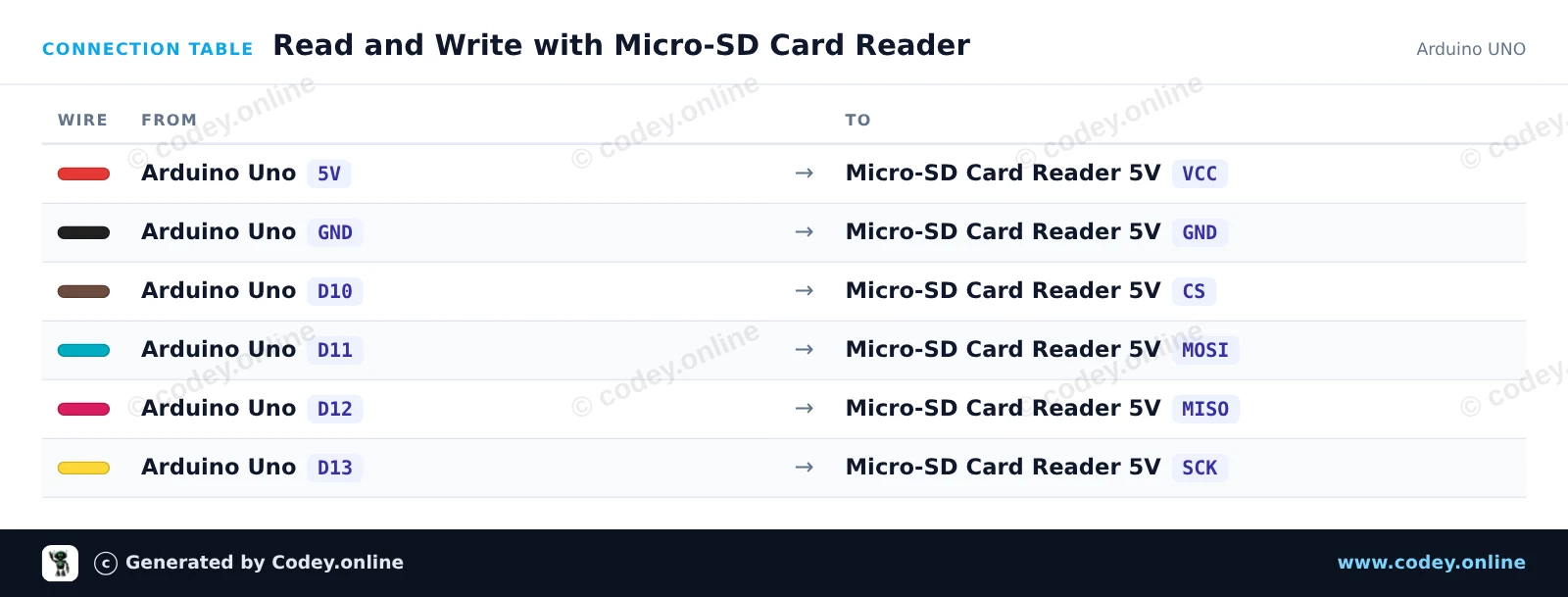
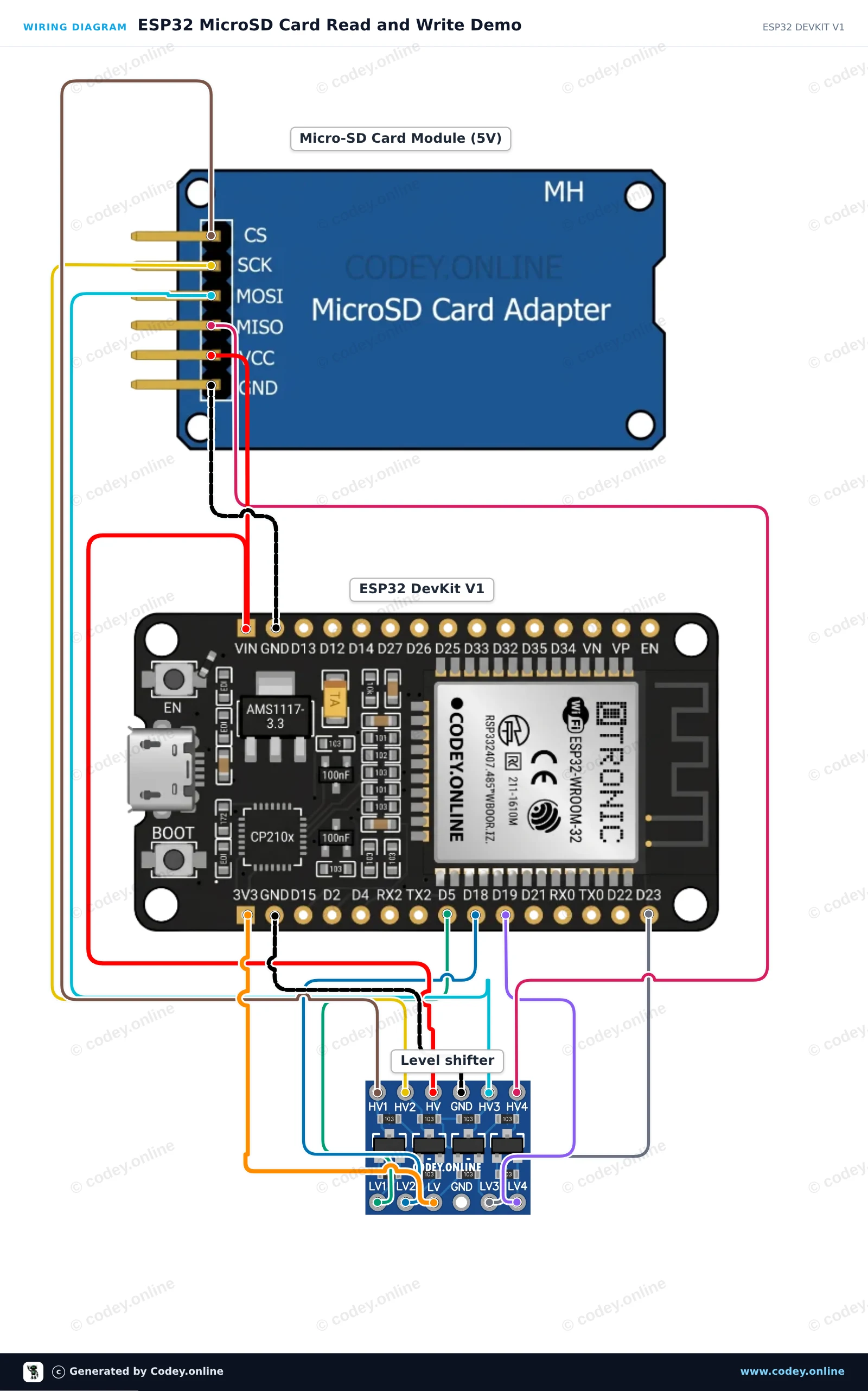
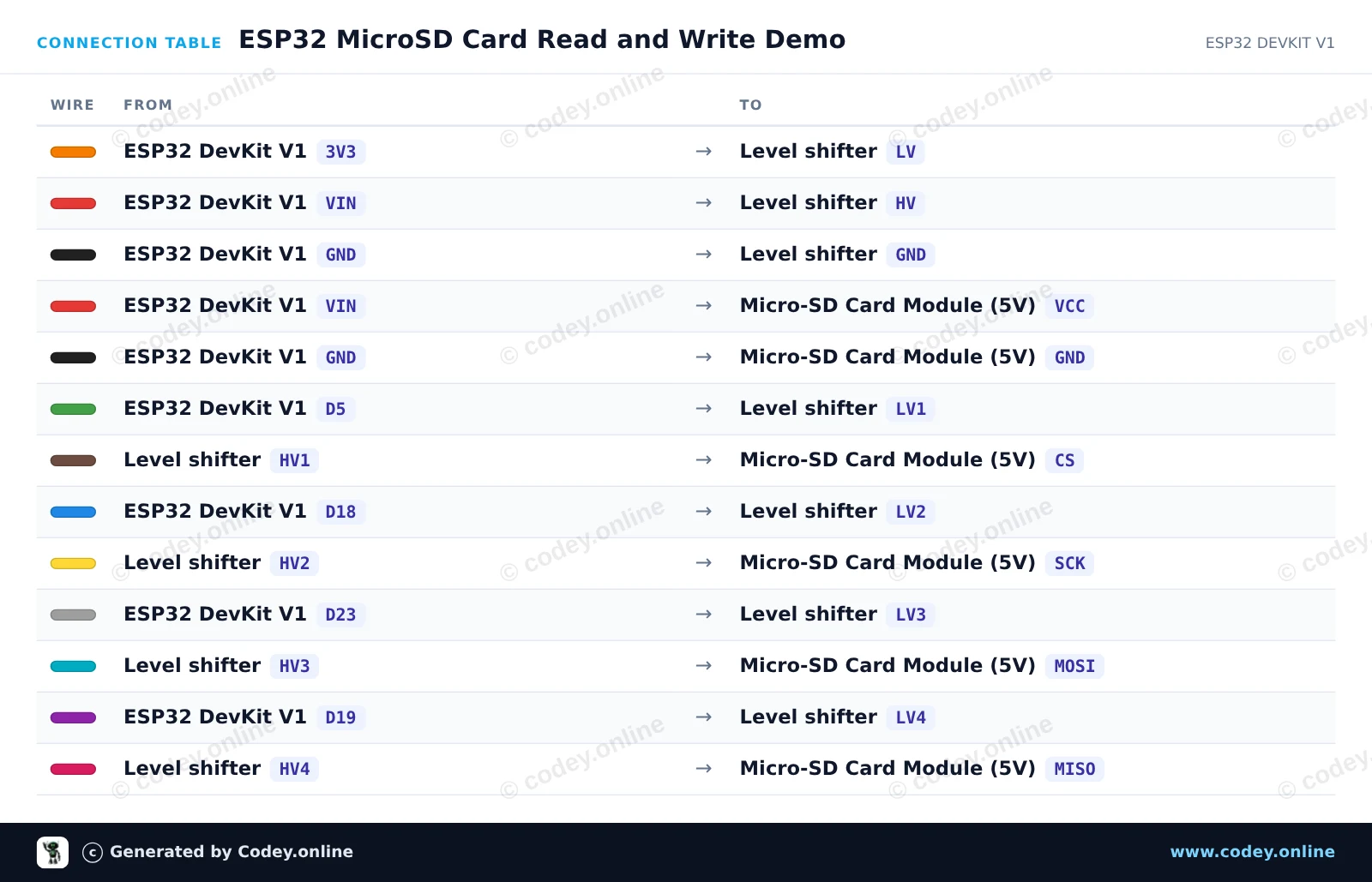
Tak podłączysz Czytnik kart Micro SD do Arduino do Arduino UNO lub ESP32, z przykładowym szkicem, który możesz od razu wgrać.
Ten projekt pokazuje, jak podłączyć czytnik kart Micro-SD 5V do Arduino Uno za pomocą komunikacji SPI. Sketch inicjalizuje kartę SD, zapisuje linię tekstu do pliku o nazwie test.txt, a następnie odczytuje plik z powrotem w Serial Monitor. Otwórz Serial Monitor z prędkością 115200 baud, aby zobaczyć wynik.
/*
 * ==================================================================
 *  Generated by Codey.online  —  https://www.codey.online
 * ==================================================================
 *  Project   : Read and Write with Micro-SD Card Reader
 *  Board     : Arduino UNO (arduino:avr:uno)
 *  Parts     : Micro-SD Card Reader 5V
 *  Libraries : none (built-in)
 *
 *  Codey Online is an AI-powered browser IDE for Arduino and ESP32.
 *  Describe your project and Codey writes the code, draws the wiring
 *  diagram and uploads it to your board, straight from the browser.
 *  This code is free to use, modify and share, without warranty.
 * ==================================================================
 */

#include <SPI.h>
#include <SD.h>

const int chipSelect = 10;

void setup() {
  Serial.begin(115200);
  while (!Serial) {
    ; // Wait for serial port to connect
  }

  Serial.println(F("Initializing SD card..."));

  if (!SD.begin(chipSelect)) {
    Serial.println(F("Initialization failed! Check wiring and FAT16/FAT32 format."));
    return;
  }
  Serial.println(F("Initialization done."));

  // Write data to the card
  File myFile = SD.open("test.txt", FILE_WRITE);
  if (myFile) {
    Serial.print(F("Writing to test.txt..."));
    myFile.println(F("Hello from Arduino UNO!"));
    myFile.close();
    Serial.println(F(" done."));
  } else {
    Serial.println(F("Error opening test.txt for writing."));
  }

  // Read data back from the card
  myFile = SD.open("test.txt");
  if (myFile) {
    Serial.println(F("--- Content of test.txt ---"));
    while (myFile.available()) {
      Serial.write(myFile.read());
    }
    myFile.close();
    Serial.println(F("--- End of file ---"));
  } else {
    Serial.println(F("Error opening test.txt for reading."));
  }
}

void loop() {
  // Demo runs once in setup
}Wiring diagram and example code generated by Codey.online — https://www.codey.online
Podłącz moduł karty MicroSD 5V do ESP32 za pomocą 4-kanałowego konwertera poziomów logicznych, aby zapewnić bezpieczną komunikację SPI 3.3V. Sketch inicjalizuje kartę SD na magistrali VSPI, tworzy i zapisuje plik testowy, a następnie odczytuje jego zawartość w Serial Monitor przy 115200 baud.
/*
 * ==================================================================
 *  Generated by Codey.online  —  https://www.codey.online
 * ==================================================================
 *  Project   : ESP32 MicroSD Card Read and Write Demo
 *  Board     : ESP32 DEVKIT V1 (esp32:esp32:esp32doit-devkit-v1)
 *  Parts     : Micro-SD Card Reader 5V
 *  Libraries : none (built-in)
 *
 *  Codey Online is an AI-powered browser IDE for Arduino and ESP32.
 *  Describe your project and Codey writes the code, draws the wiring
 *  diagram and uploads it to your board, straight from the browser.
 *  This code is free to use, modify and share, without warranty.
 * ==================================================================
 */

#include "FS.h"
#include "SD.h"
#include "SPI.h"

const int chipSelect = 5;

void setup() {
  Serial.begin(115200);
  while (!Serial) { delay(10); }

  Serial.println("Initializing SD card...");

  if (!SD.begin(chipSelect)) {
    Serial.println("Card Mount Failed! Check wiring and ensure a FAT32 card is inserted.");
    return;
  }

  uint8_t cardType = SD.cardType();
  if (cardType == CARD_NONE) {
    Serial.println("No SD card attached.");
    return;
  }

  Serial.print("SD Card Type: ");
  if (cardType == CARD_MMC) Serial.println("MMC");
  else if (cardType == CARD_SD) Serial.println("SDSC");
  else if (cardType == CARD_SDHC) Serial.println("SDHC");
  else Serial.println("UNKNOWN");

  uint64_t cardSize = SD.cardSize() / (1024 * 1024);
  Serial.printf("SD Card Size: %lluMB\n", cardSize);

  // Write to a test file
  Serial.println("Writing to test.txt...");
  File file = SD.open("/test.txt", FILE_WRITE);
  if (file) {
    file.println("Hello from ESP32 and MicroSD Card!");
    file.close();
    Serial.println("Write complete.");
  } else {
    Serial.println("Error opening file for writing.");
  }

  // Read the test file back
  Serial.println("Reading test.txt:");
  file = SD.open("/test.txt");
  if (file) {
    while (file.available()) {
      Serial.write(file.read());
    }
    file.close();
  } else {
    Serial.println("Error opening file for reading.");
  }
}

void loop() {
  // Idle
}Wiring diagram and example code generated by Codey.online — https://www.codey.online





 English
  Nederlands
  Frans
Frans  Deutsch
  Italiano
  Español
  Suomi
Suomi  Dansk
Dansk  Ελληνικά
  Български
  Čeština
  Hrvatski
  Aileen