SKU: OT2043-A54 Numer artykułu: AB072 EAN: 4577243565130

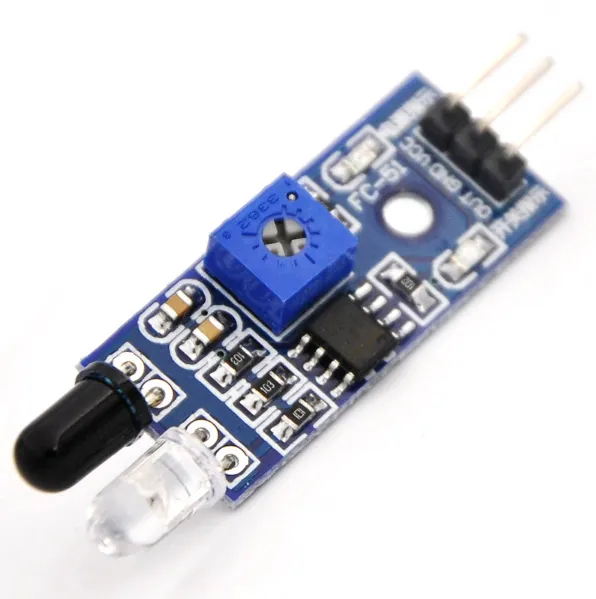
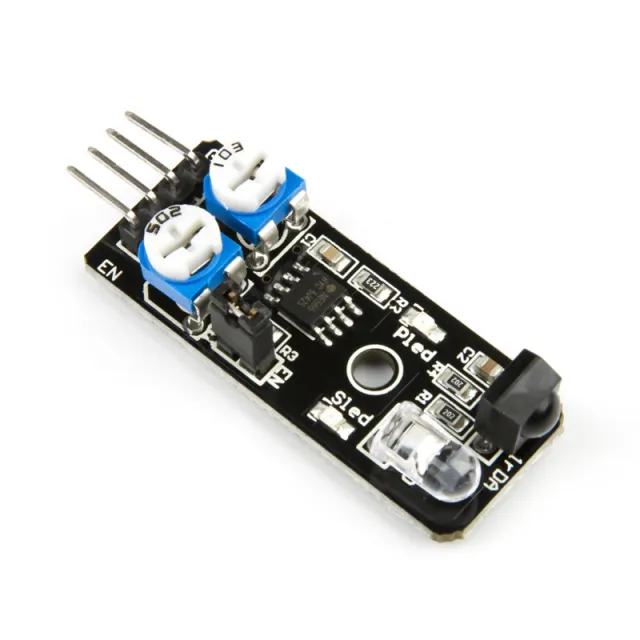
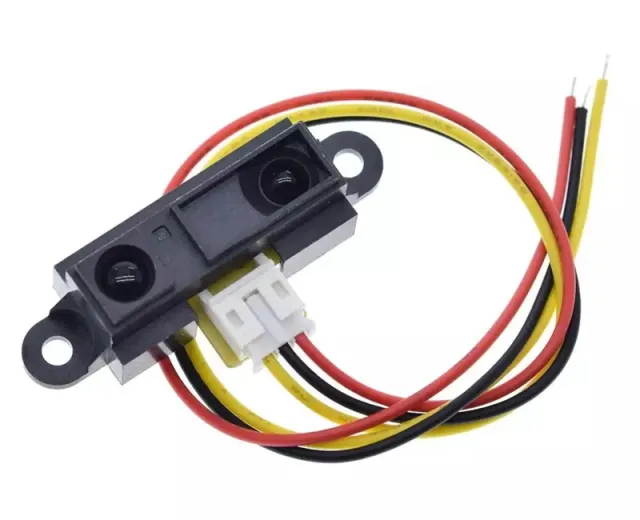
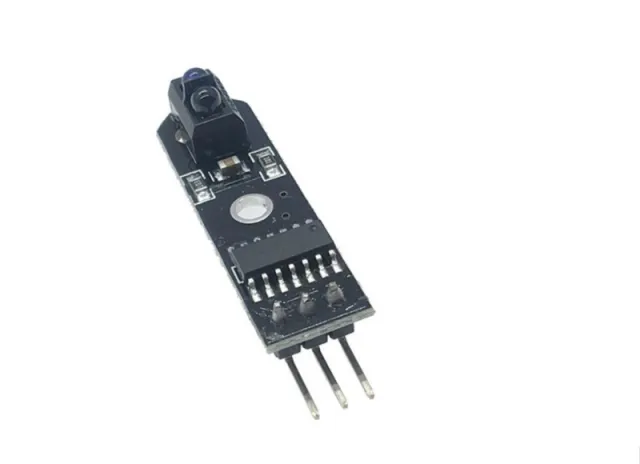
Moduł unikania przeszkód na podczerwień.
Wysyła sygnał 5V, gdy nie ma przeszkód, oraz sygnał 0V, gdy pojawi się przeszkoda, a zielona dioda LED zapala się. Odległość można regulować potencjometrem. Działa z 3.3V i 5V, ma czerwoną diodę zasilania LED.
Odczytuje odległość do przeszkód w zakresie 2-30cm i 35 stopni za pomocą sygnałów podczerwieni. Zawiera nadajnik i odbiornik podczerwieni.
Afmetingen
Długość: 4,5cm
Szerokość: 1,4cm
Wysokość: 0,9cm
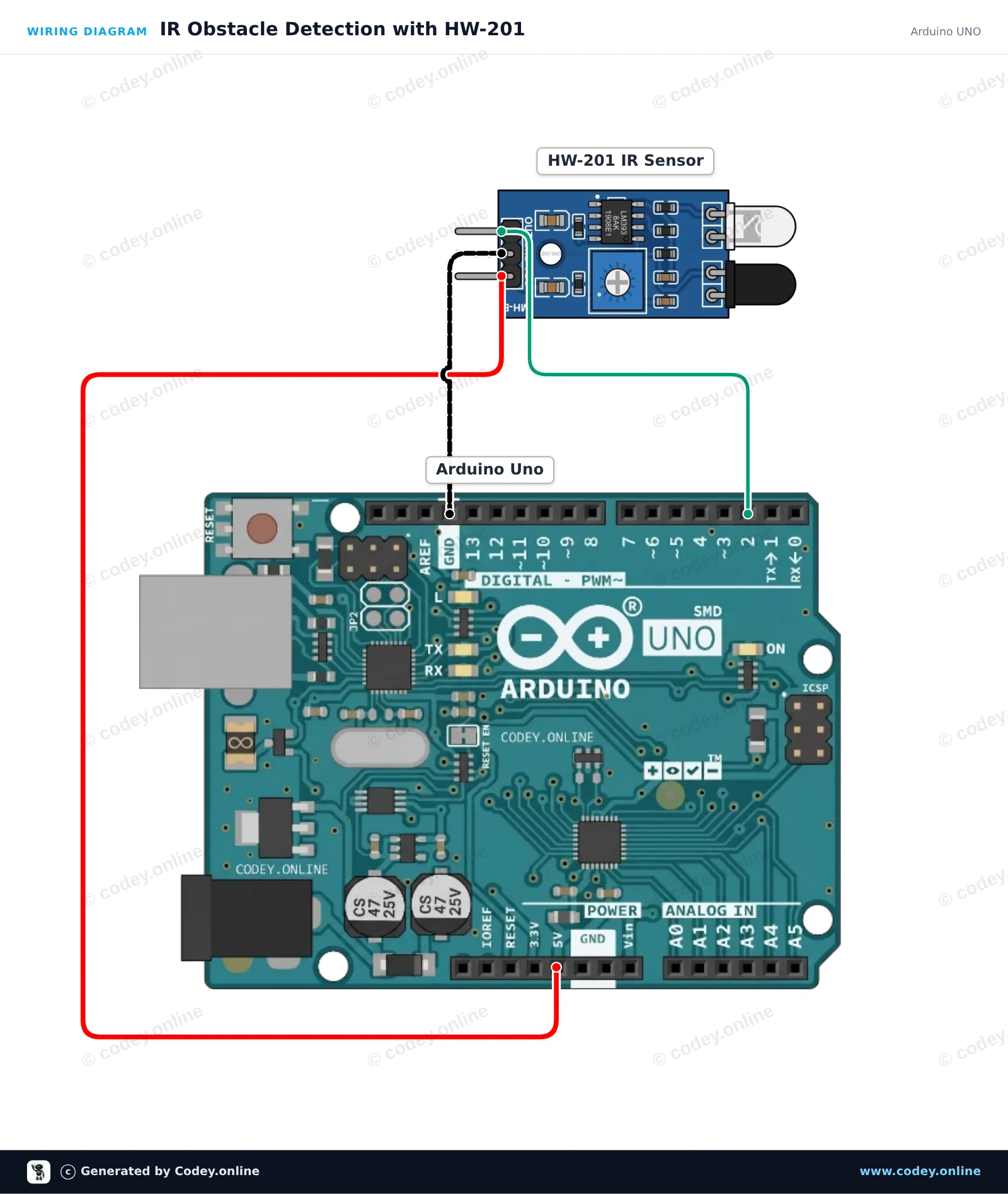
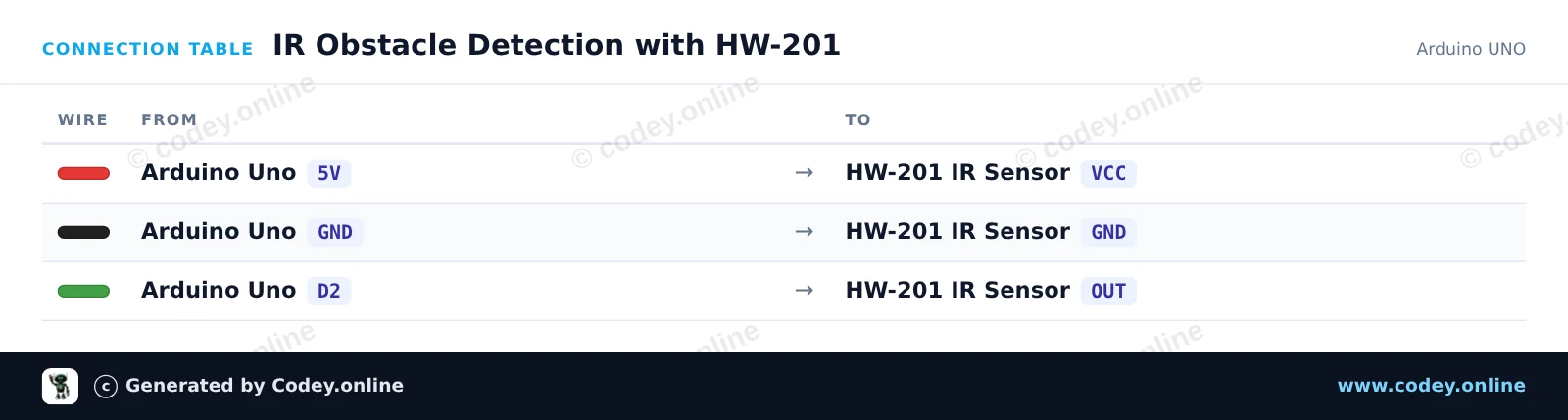
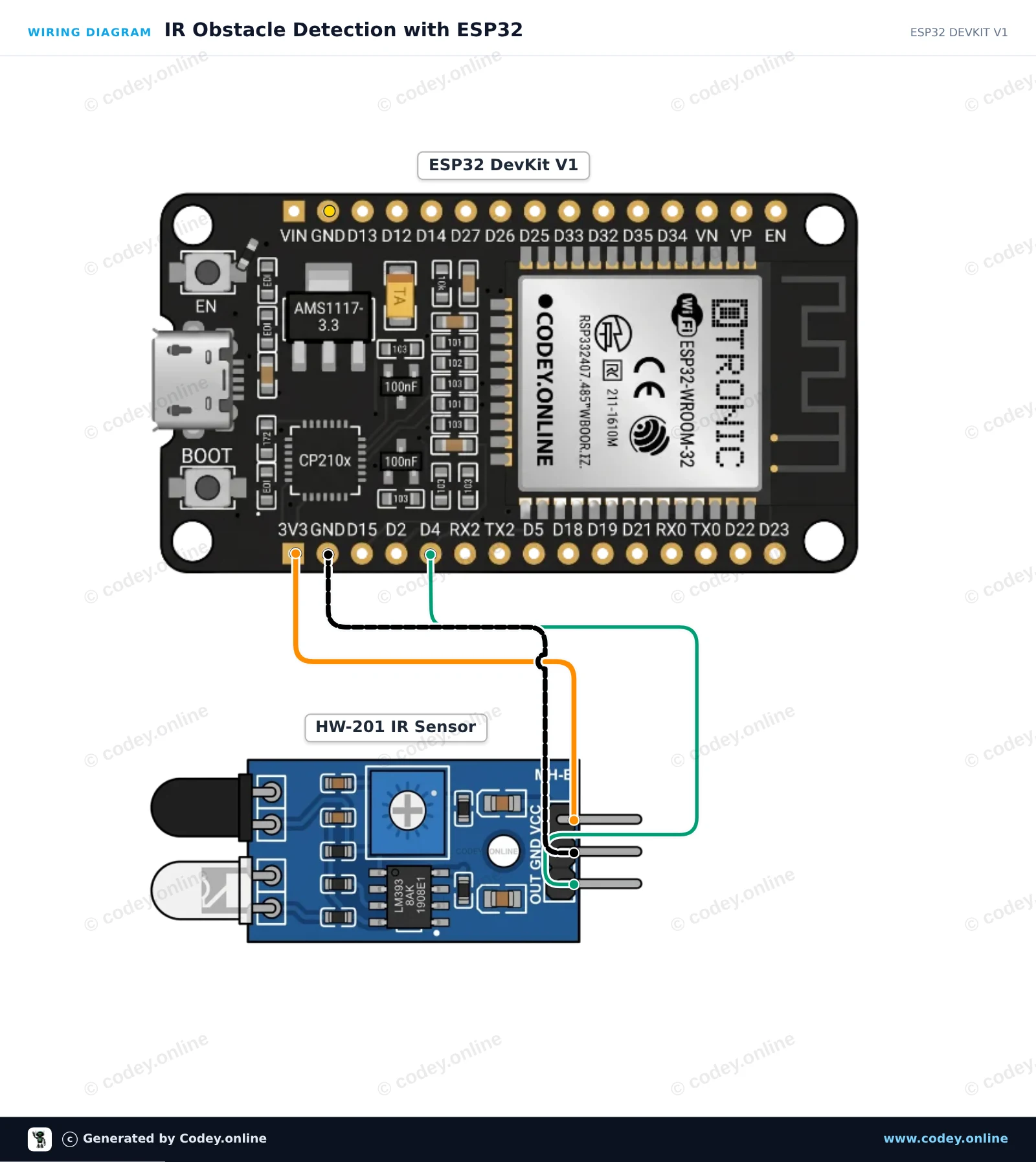
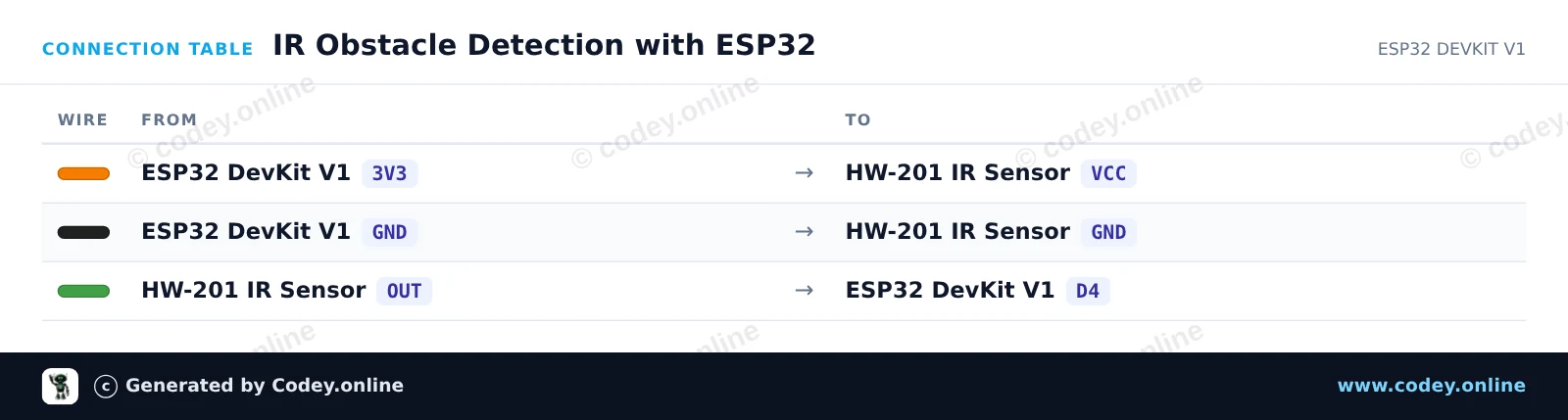
Tak podłączysz Moduł unikania przeszkód na podczerwień HW-201 do Arduino UNO lub ESP32, z przykładowym szkicem, który możesz od razu wgrać.
Ten projekt wykorzystuje czujnik podczerwieni HW-201 do omijania przeszkód, aby wykrywać obiekty w pobliżu. Gdy przeszkoda znajdzie się w zasięgu, wyjście cyfrowe czujnika przechodzi w stan LOW, co włącza wbudowaną diodę LED Arduino i wyświetla alerty wykrycia w Serial Monitor. Wyreguluj onboardowy potencjometr na module czujnika, aby skalibrować odległość wykrywania.
/*
 * ==================================================================
 *  Generated by Codey.online  —  https://www.codey.online
 * ==================================================================
 *  Project   : IR Obstacle Detection with HW-201
 *  Board     : Arduino UNO (arduino:avr:uno)
 *  Parts     : HW-201 Infrared Obstacle Avoidance Module
 *  Libraries : none (built-in)
 *
 *  Codey Online is an AI-powered browser IDE for Arduino and ESP32.
 *  Describe your project and Codey writes the code, draws the wiring
 *  diagram and uploads it to your board, straight from the browser.
 *  This code is free to use, modify and share, without warranty.
 * ==================================================================
 */

// Pin definitions
const int sensorPin = 2;
const int ledPin = 13;

void setup() {
  pinMode(sensorPin, INPUT);
  pinMode(ledPin, OUTPUT);

  Serial.begin(115200);
  Serial.println(F("HW-201 IR Obstacle Sensor Demo"));
  Serial.println(F("Ready: Move an object in front of the sensor."));
}

void loop() {
  // The HW-201 sensor outputs LOW when an obstacle is detected
  int sensorState = digitalRead(sensorPin);

  if (sensorState == LOW) {
    digitalWrite(ledPin, HIGH);
    Serial.println(F("Obstacle Detected!"));
  } else {
    digitalWrite(ledPin, LOW);
    Serial.println(F("Clear (no obstacle)"));
  }

  delay(200);
}Wiring diagram and example code generated by Codey.online — https://www.codey.online
Ten projekt odczytuje cyfrowe wyjście modułu HW-201 Infrared Obstacle Avoidance Module. Gdy obiekt zostanie wykryty w zasięgu, wyjście czujnika przechodzi w stan LOW, zapalając wbudowaną diodę LED ESP32 i wyświetlając alert w Serial Monitor. Możesz regulować odległość wykrywania za pomocą potencjometru na module.
/*
 * ==================================================================
 *  Generated by Codey.online  —  https://www.codey.online
 * ==================================================================
 *  Project   : IR Obstacle Detection with ESP32
 *  Board     : ESP32 DEVKIT V1 (esp32:esp32:esp32doit-devkit-v1)
 *  Parts     : HW-201 Infrared Obstacle Avoidance Module
 *  Libraries : none (built-in)
 *
 *  Codey Online is an AI-powered browser IDE for Arduino and ESP32.
 *  Describe your project and Codey writes the code, draws the wiring
 *  diagram and uploads it to your board, straight from the browser.
 *  This code is free to use, modify and share, without warranty.
 * ==================================================================
 */

// HW-201 IR Obstacle Sensor with ESP32
const int SENSOR_PIN = 4;   // Connected to OUT pin of HW-201
const int LED_PIN = 2;      // Onboard LED

void setup() {
  Serial.begin(115200);
  pinMode(SENSOR_PIN, INPUT);
  pinMode(LED_PIN, OUTPUT);

  Serial.println("HW-201 Obstacle Sensor Ready");
}

void loop() {
  // The HW-201 output is active-LOW (LOW when an obstacle is detected)
  int sensorState = digitalRead(SENSOR_PIN);

  if (sensorState == LOW) {
    digitalWrite(LED_PIN, HIGH);
    Serial.println("Obstacle detected!");
  } else {
    digitalWrite(LED_PIN, LOW);
    Serial.println("Path clear");
  }

  delay(200);
}Wiring diagram and example code generated by Codey.online — https://www.codey.online






 English
  Nederlands
  Frans
Frans  Deutsch
  Italiano
  Español
  Suomi
Suomi  Dansk
Dansk  Ελληνικά
  Български
  Čeština
  Hrvatski
  Aileen